Jump Scare Scene Monitoring
Author: Aleksandar Dimov, BIOPAC Systems Inc. 2026
Overview
This example shows how to build a SightLab study in which the participant monitors an office scene for subtle changes, responds when they notice movement, and then receives a timed jump scare event. The script also enables BIOPAC AcqKnowledge integration so physiological recordings can be synchronized with task events and participant responses. The session can later be reviewed with SightLab Session Replay to inspect gaze behavior, object views, and timing around the scare events.
Source script: JumpScare.py
What this example does
The script creates a single-trial, non-GUI SightLab experiment with BIOPAC enabled:
sightlab = sl.SightLab(gui=False, biopac=True)
sightlab.setTrialCount(1)
It loads an office environment, registers important scene objects for analytics, shows instructions, starts AcqKnowledge acquisition, and schedules a sequence of environmental changes and jump scares during the trial.
Study concept
The participant is told that something in the room will occasionally change and that they should press the trigger when they notice it. The instruction text in the script is:
Occasionally something in the environment will subtly change.
When it does, press the trigger button.
To start, press the trigger button of the controller.
This makes the task useful for experiments involving:
- vigilance and scene monitoring
- orienting responses to subtle environmental changes
- physiological arousal before and after a scare
- gaze behavior leading into salient or threatening events
Why BIOPAC is used here
BIOPAC AcqKnowledge is enabled directly in the SightLab constructor with biopac=True. SightLab supports BIOPAC integration as an experiment option, and when enabled it attempts to connect to the AcqKnowledge server.
In this script, BIOPAC is used for two purposes:
- Start synchronized physiological acquisition
- Insert event markers for stimuli and participant responses
At the start of the experiment, the script loads a BIOPAC template file and starts acquisition if AcqKnowledge is not already recording:
templatePath = os.path.join(os.path.dirname(os.path.abspath(__file__)), '..', 'ringtemplate.gtl')
sightlab.acqServer.LoadTemplate(templatePath)
if not sightlab.acqServer.getAcquisitionInProgress():
    sightlab.acqServer.toggleAcquisition()
This means physiological channels such as ECG, EDA, respiration, or other configured BIOPAC signals can be recorded while the participant completes the monitoring task and experiences the scare sequence.
Event markers sent to AcqKnowledge
A major strength of this example is that key events are explicitly marked in AcqKnowledge with insertGlobalEvent(...). That gives you clean synchronization points between the VR task and the physiological recording.
The script sends the following markers:
| Event | Marker type | Purpose |
|---|---|---|
Picture1 |
stim |
first subtle picture movement |
ClockSpin |
stim |
first clock-hand movement |
FanOn |
stim |
fan starts moving |
FanOff |
stim |
fan stops |
Jumpscare1 |
stim |
first jump scare onset |
Picture2 |
stim |
second subtle picture movement |
ClockSpin2 |
stim |
second clock-hand movement |
Jumpscare2 |
stim |
second jump scare onset |
User Response |
resp |
participant pressed trigger or n |
These markers are defined directly in the scheduled event functions and in the response listener.
This makes it straightforward to align physiology with:
- the onset of subtle scene changes
- the participant’s detection response
- the onset of each jump scare
- the recovery period after the scare
Scene objects tracked by SightLab
The script registers several scene objects so SightLab can include them in gaze and object-view analytics:
sightlab.addSceneObject('pictureone', pictureone, gaze=True, grab=False)
sightlab.addSceneObject('picturetwo', picturetwo, gaze=True, grab=False)
sightlab.addSceneObject('zombie', zombie, gaze=True, grab=False)
sightlab.addSceneObject('minutehand', minutehand, gaze=True, grab=False)
sightlab.addSceneObject('fan', fan, gaze=True, grab=False)
sightlab.addSceneObject('chair', chair, gaze=False, grab=True)
This lets you inspect whether participants were already looking at the changed object, whether they orient to the jump scare source, and how visual attention shifts across the scene.
A useful implementation detail in this example is that the picture nodes are registered before they are re-parented to pivot nodes. The script comments explain that this avoids replay problems where the full environment could otherwise be reloaded for each picture node.
Timeline of the trial
The trial lasts 130 seconds and uses scheduled timed events measured from trial start. The script defines these timings:
| Time from trial start | Event |
|---|---|
| 10 s | Picture1 |
| 15 s | ClockSpin |
| 20 s | FanOn |
| 25 s | FanOff |
| 27 s | Jumpscare1 |
| 34 s | Picture2 |
| 37 s | ClockSpin2 |
| 42 s | Jumpscare2 |
The trial then auto-ends at 130 seconds.
This event structure is helpful because it creates a progression from:
- low-level environmental anomalies
- participant detection and anticipation
- sudden salient threat events
That makes the script well suited for examining buildup and reactivity in both gaze and physiology.
How the subtle movement cues work
Before the scare, the participant is asked to watch for subtle changes. The script creates these changes using animated objects in the office scene:
1. Hanging pictures sway on pivots
Two pictures are wrapped in pivot nodes and then animated with a damped sway function. This makes them appear to hinge or tilt unnaturally.
2. Clock hand spins
The minute hand is rotated with a timed spin action and a matching sound effect.
3. Fan turns on and off
The fan animation is started and later stopped, with matching event markers and audio.
Together, these cues create a vigilance task where the participant actively scans the room for anomalies instead of passively waiting for the scare.
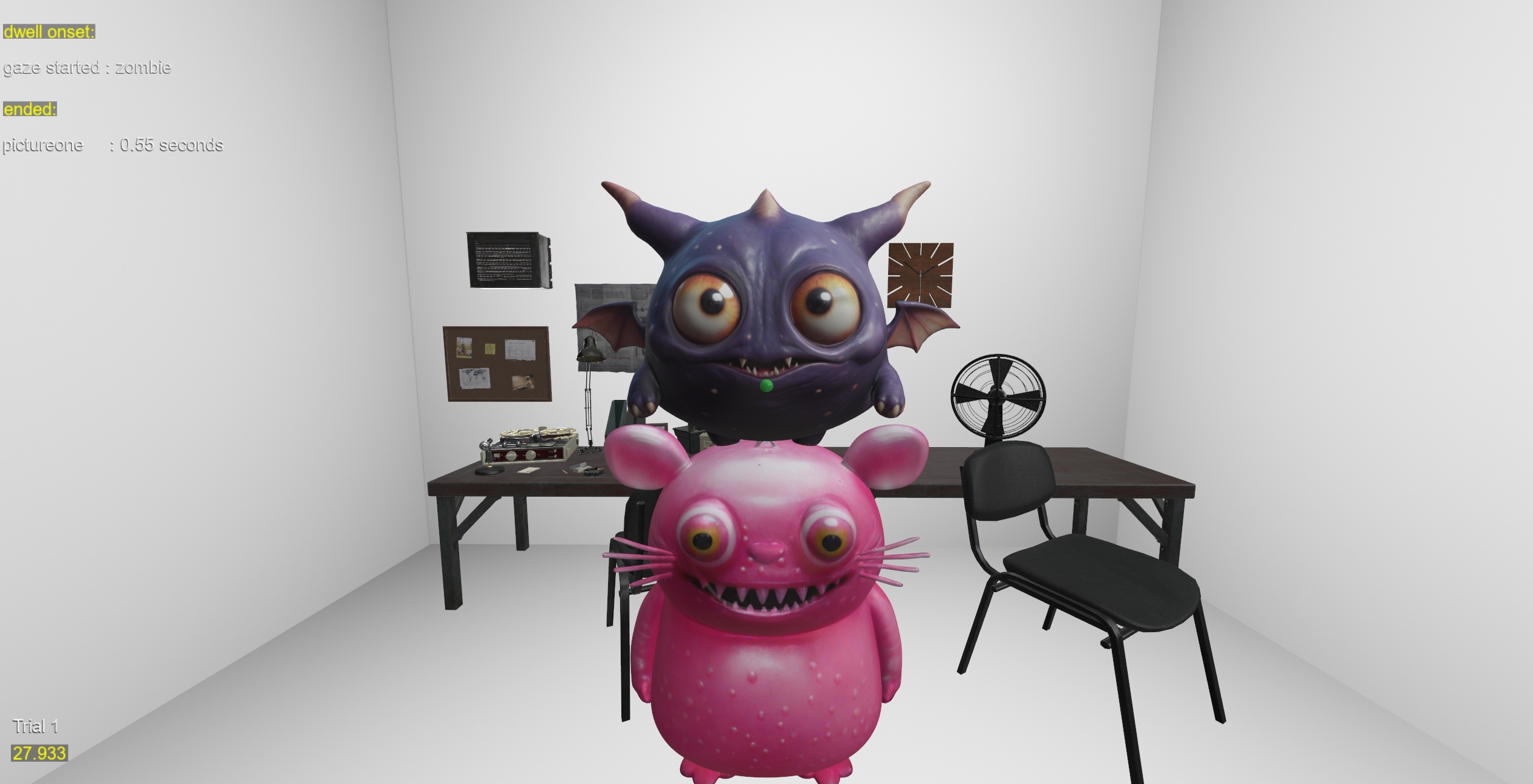
How the jump scare works
There are two jump scares in the script. Each one:
- inserts a BIOPAC stimulus marker
- distorts the room briefly by scaling the environment
- flashes a red strobe light
- places a monster directly in front of the user
- plays a scare sound
- fades the monster back out after a short delay
The first scare places the monster about 1.5 meters in front of the user, while the second one is placed closer, at about 0.7 meters in front of the user. Both use the current head position and yaw to spawn the figure directly in front of the participant. fileciteturn1file2 fileciteturn1file8 fileciteturn1file17
Because the scare is anchored relative to the participant viewpoint, it remains effective regardless of where the participant is looking or standing.
Participant responses
The script listens for either:
- keyboard
n - controller
triggerPress
When a response happens, it sends a User Response marker to AcqKnowledge:
sightlab.acqServer.insertGlobalEvent('User Response', 'resp', '')
This lets you compare:
- time from scene change to response
- missed changes versus detected changes
- physiology at response time
- whether detection performance shifts after the first scare
Session Replay and post-session analysis
This example is especially useful with Session Replay. SightLab writes replay data along with its other trial outputs, and replay can be used to inspect the participant’s scan path, dwell behavior, gaze point, interactions, and related visual analytics. SightLab documentation notes that replay supports analytics such as heatmaps, scan paths, dwell time, and user interactions.
For this jump scare study, replay is useful for questions like:
- Was the participant looking at the changing object before responding?
- Did the participant visually inspect the fan, clock, or pictures?
- Did gaze lock onto the scare object immediately?
- How did scan behavior change after the first jump scare?
The included example list also points to Session Replay as a standard SightLab workflow, and the replay system stores .rply files for playback.
Data you can relate to physiology
Because the script combines object tracking, response markers, and BIOPAC events, you can align physiological changes with behavior at multiple levels.
Possible analyses include:
- EDA / skin conductance: response to subtle events versus jump scares
- heart rate or interbeat interval: orienting and startle responses
- pupil diameter or eye openness: where supported by the headset and hardware
- gaze dwell and fixation timing: whether attention predicted later detection or delayed startle
- time to first fixation on the zombie: immediate orienting after scare onset
SightLab’s exported trial and summary data can include gaze intersection, eye rotation, head position, fixation and saccade measures, pupil diameter, and related trial summaries depending on hardware and logging configuration.
Experiment flow in plain language
- The participant enters the office scene.
- Instructions explain that they should detect subtle movement changes.
- BIOPAC AcqKnowledge is connected and acquisition begins.
- The participant starts the trial.
- Small events occur in the room: picture sway, clock spin, fan movement.
- The participant presses the trigger when they notice a change.
- The script sends both stimulus and response markers to BIOPAC.
- Two jump scares occur later in the trial.
- The trial ends automatically.
- You review physiology, behavioral responses, and replay data together.
Why this is a strong example for multimodal research
This script is a good template for fear, vigilance, attention, and psychophysiology studies because it combines:
- a naturalistic 3D environment
- eye tracking and object analytics
- explicit participant responses
- synchronized BIOPAC event markers
- replay-based qualitative review
It is more informative than a simple jump-scare demo because it creates a measurable pre-scare monitoring phase, which can be used to study anticipation, uncertainty, response accuracy, and post-scare attentional changes.
Practical notes
BIOPAC requirement
This example assumes AcqKnowledge is available and that the AcqKnowledge server can be reached by SightLab. If the connection fails, the script prints an error when attempting to load the template or start acquisition.
Trial start and stop
The experiment waits for EXPERIMENT_START, shows instructions, waits for triggerPress, and then starts the trial. It later ends the trial automatically with endTrial(...).
Suggested use cases
You could adapt this example for:
- threat anticipation studies
- habituation across repeated scare exposures
- comparison of detected versus missed environmental changes
- pre/post scare changes in search strategy
- physiology-triggered adaptive horror content
- response latency experiments with gaze validation
Related SightLab features to mention alongside this example
- Session Replay for reviewing heatmaps, scan paths, dwell time, and interactions after the study.
- Experiment Summary and Trial Timeline outputs for object-level viewing analysis.
- BIOPAC markers for synchronization with AcqKnowledge.