360 Media
A trial in SightLab can use a 360° or 180° video or image as its environment instead of a 3D model. The participant views the media from its center. SightLab records where they look on it and on any regions of interest (ROIs) you add, and you can replay the session with gaze visualizations on top of the media.
This page collects everything about 360 media in SightLab, with links to the pages that cover each part in detail.
Supported Media
| Videos | .avi, .mpg, .mpeg, .mp4, .mov (some formats need the K-Lite Codec Pack) |
| Images | .jpg, .jpeg, .png, .bmp, .tif, .tiff, .gif |
| Monoscopic | One equirectangular image, usually twice as wide as it is tall (for example 3840 × 1920) |
| Stereoscopic T/B | The left eye's image on top of the right eye's, usually a square frame (for example 2560 × 2560) |
| Stereoscopic L/R | Side-by-side 180° video or image |
| Resolution | Up to 8K, mono or stereo (SightLab 2.8.11 and later). Videos wider than 4K need 8K video support; see 8K video |
To find or create 360 media, including AI-generated 360 images, see Getting 3D Models and Assets.
8K video
SightLab plays videos wider than 4K with the av (PyAV) package, which isn't installed with SightLab. Before using 8K video, install it once:
- Run
Util_Files\Sightlab2_8K_Video_Support_Installer.exein your SightLab projects folder (it doesn't need administrator rights), or - Run
install avin the CMD tab of Vizard's Package Manager.
If Vizard is open, restart it afterwards. Without PyAV, SightLab plays these videos with Vizard's standard video player, which may play them poorly, and shows a message the first time one loads. Videos up to 4K don't need PyAV, including side-by-side stereo videos that are up to 4K per eye.
SightLab plays an 8K video's audio from a <video name>_audio.wav file, which it creates next to the video the first time the video is used. If you replace the video, delete that file so SightLab creates it again.
If your hardware struggles to play 8K video, downscale it (this also needs PyAV) by adding this code at the top of your script, before SightLab is imported:
import sightlab_utils.panorama_utils as panorama_utils

# Halve 8K → 4K before uploading to the GPU
panorama_utils.DOWNSCALE_TARGET = (3840, 1920)
For smoother playback in a headset, you can also compress the video with the Video Compressor.
Setting Up a 360 Trial
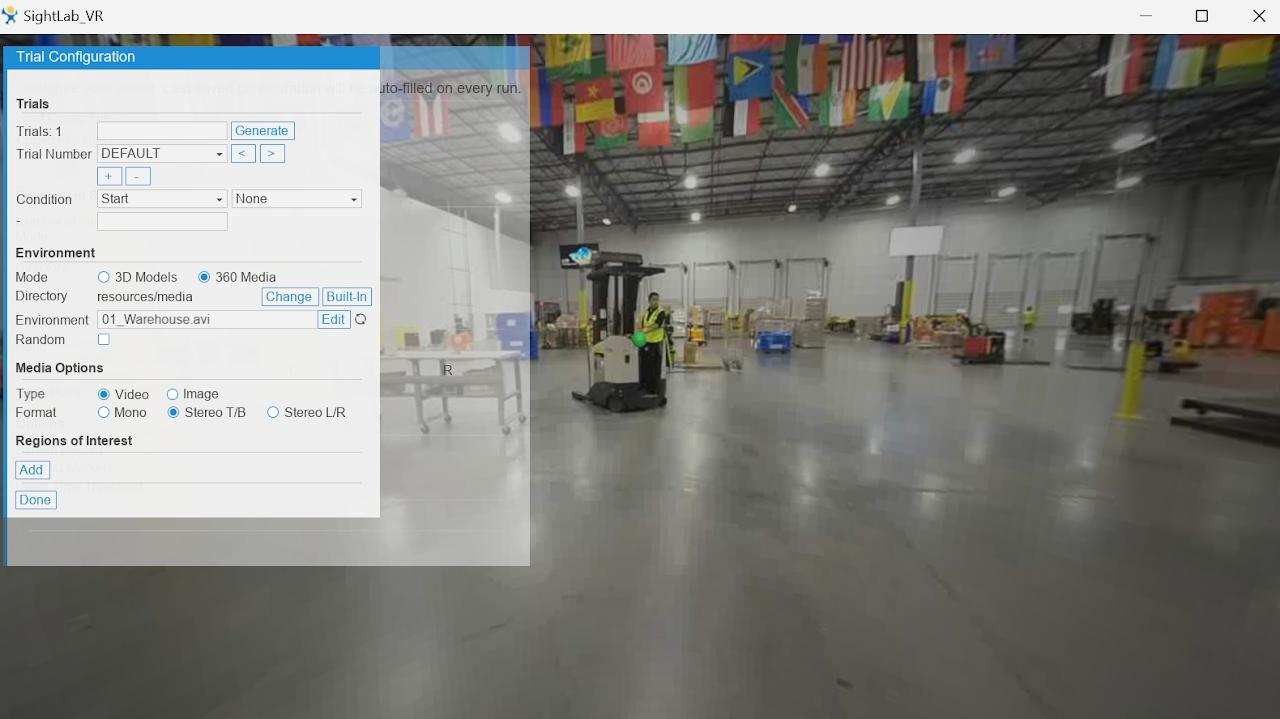
- In the trial editor, set Mode to 360 Media.
- Choose the media from your project's
resources/mediafolder, or click Built-In to use SightLab's included 360 media. - Set Type to Video or Image, and Format to Mono, Stereo T/B or Stereo L/R.
- Add regions of interest (see below).
See Creating Your First SightLab Project and the GUI Overview for each step.
Regions of Interest
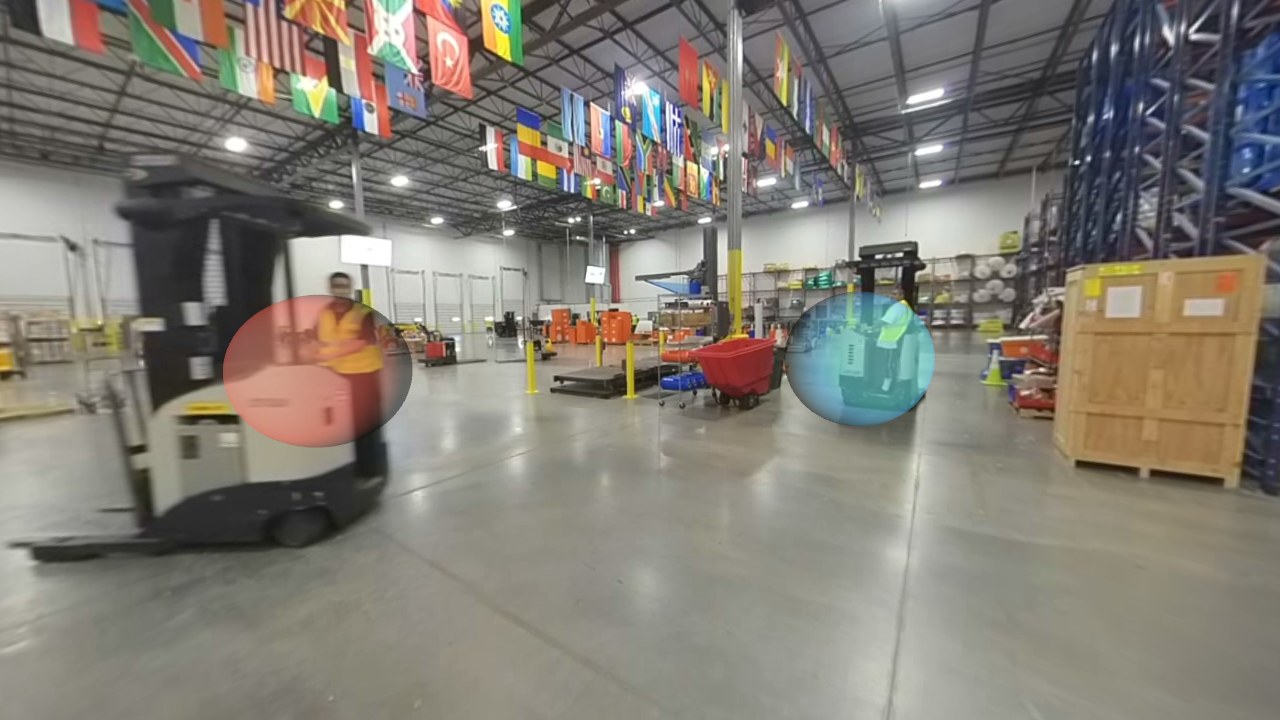
Regions of interest are the parts of the media you want gaze data for. Dwell time, fixations and time to first fixation are recorded for each ROI under its name.
- Regions that stay in place: in the trial editor, press Add (or Left Shift), move the gaze point over the area and press 1. Then set the region's name, size, opacity and color. See Adding ROIs to 360 media.
- Regions that follow moving objects: for people, vehicles or anything else that moves through a 360 video, trace the objects with the mouse in the 360 ROI Path Tracer. It adds the regions of interest to your trial, and they follow the objects during the experiment. See 360 Moving Regions of Interest.
Tip
To hide regions from the participant while still recording gaze on them, lower their opacity in the trial editor.
Gaze Data on 360 Media
The gaze point for 360 media is where the participant's gaze meets the media sphere (or an ROI in front of it), saved as 3D coordinates with the rest of the eye tracking data. See Data Collection with 360 Media for Eye Tracking.
To map gaze onto the flat video frame, for example to overlay gaze points on the video in other software, convert the coordinates to pixels in the equirectangular image with the convert_to_pixels example. See Converting 360 Spherical to Equirectangular.
Replaying 360 Sessions
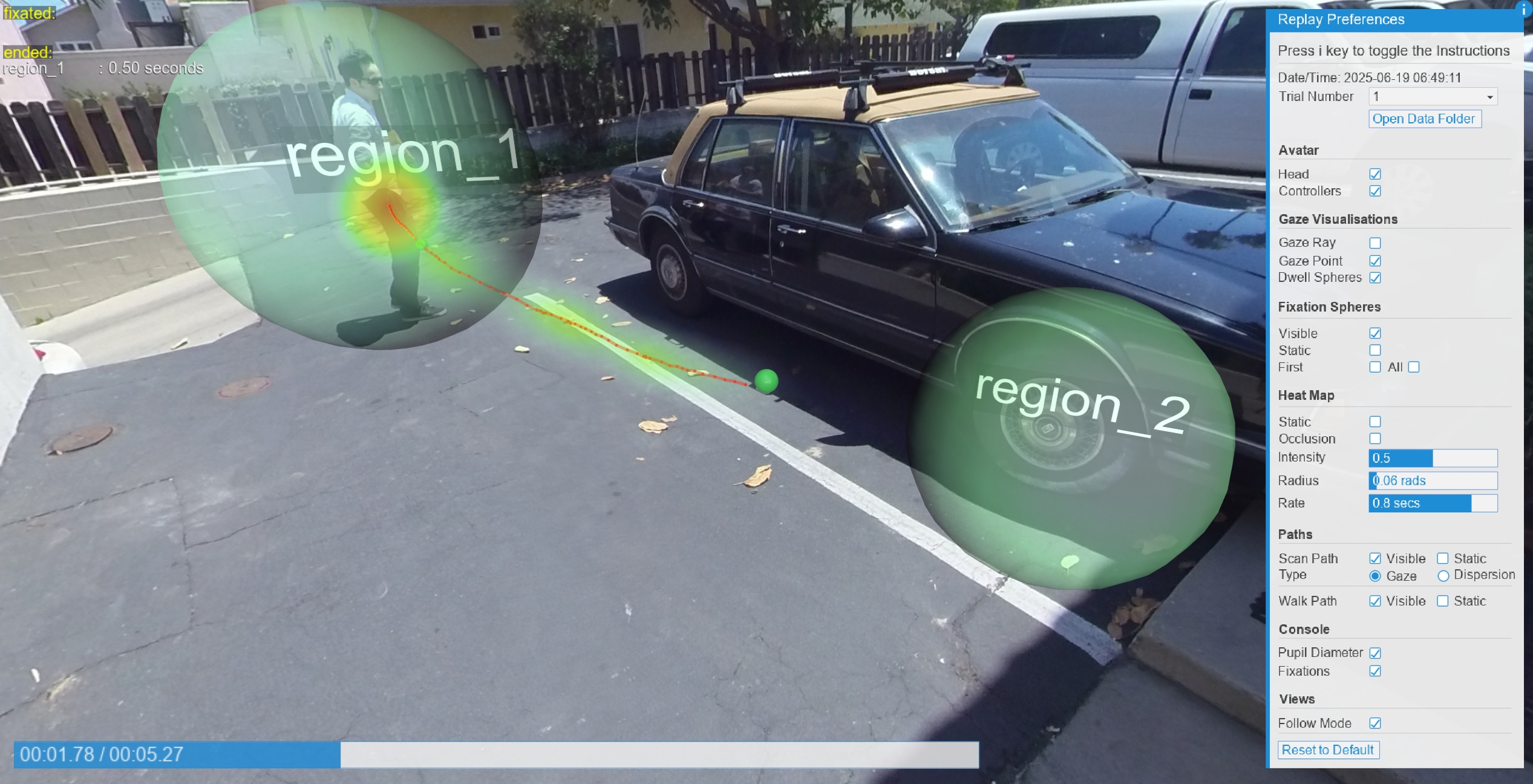
Session Replay plays the media from the participant's position, with gaze points, fixations, heat maps and scan paths on top.
- Uncheck Follow Mode to look around freely instead of following the participant's head.
- Check ROIs to show the regions of interest and Tags to show their names. Moving regions follow the paths they had during the trial.
- Press 3 to save an equirectangular image of the whole 360 view, with the visualizations on it.
Controlling 360 Media in Code
To set up 360 media in a script instead of the GUI, pass the video or image to setEnvironment with mode = MEDIA_360. From the 360 non GUI example:
import sightlab_utils.sightlab as sl
from sightlab_utils.settings import *

sightlab = sl.SightLab(gui = False)

video1 = viz.addVideo('sightlab_resources/media/01_Warehouse.avi')

# mediaFormat: "Monoscopic", "Stereoscopic T/B" or "Stereoscopic L/R"; mediaType "image" for images
sightlab.setEnvironment(video1, mode = MEDIA_360, mediaType = "video", mediaFormat = "Stereoscopic T/B")
During an experiment, with or without the GUI:
| Code | What it does |
|---|---|
sightlab.getMediaObject() |
The video, to call .play(), .pause(), .setTime() and .getTime() |
sightlab.getEnvironment() |
The media sphere, to rotate or scale it |
sightlab.getRegionOfInterest("name") |
A region of interest by name |
sightlab.toggleMediaPause() |
Pause or resume the video (bound to Shift + P by default) |
sightlab.enableMediaSkipKeys() |
Skip forward and back 5 seconds with V and C |
sightlab.enableEnvironmentPitchKeys() |
Tilt the media with 7 and 8 |
See Working with 360 Media in the code reference and the Example without GUI.
Changing the Rotation of the 360 Media
To turn the media so a different part of it is in front of the participant, add this code before creating SightLab in the main script. For top/bottom stereo media, replace MonoSphere with StereoSphere.
import sightlab_utils.panorama_utils as panorama_utils

_orig_MonoSphere_init = panorama_utils.MonoSphere.__init__
def _patched_MonoSphere_init(self, *args, **kwargs):
    _orig_MonoSphere_init(self, *args, **kwargs)
    self.setEuler([180, 0, 0])
panorama_utils.MonoSphere.__init__ = _patched_MonoSphere_init
And this in the replay script:
def ontrialchanged():
    env = replay.sceneObjects[MEDIA_OBJECT]
    env.setEuler(180,0,0)
viz.callback(TRIAL_LOADED_EVENT, ontrialchanged)

env = replay.sceneObjects[MEDIA_OBJECT]
env.setEuler(180,0,0)
Moving regions of interest are saved relative to the video, so they turn with it automatically.
Examples Using 360 Media
All of these can be opened from the SightLab Dashboard.
| Example | What it shows |
|---|---|
| 360 Moving Regions of Interest | Regions of interest that follow moving objects in a 360 video |
| 3D Models on a 360° Media Backdrop | 3D objects, which can be gazed at and grabbed, on top of 360 video or images |
| Media Viewer | 360 videos and images shown in a randomized order, or controlled with a STIM file |
| 360 Driving Simulator | A 3D car interior over 360 video of a New York street |
| Mixed-Reality Video | Stereo 360 or 180 video over a headset's passthrough view, with the backdrop keyed out |
360 non GUI |
360 video set up entirely in code (see Controlling 360 Media in Code) |
| Convert 360 Media to Equirectangular | Gaze coordinates converted to pixels in the video frame |
Troubleshooting
- A video won't play: install the K-Lite Codec Pack.
- The media looks distorted: see The 360 media looks distorted in the FAQ.
- The image looks doubled or squashed: check the Format. A top/bottom stereo video set to Mono shows both eyes' images stacked.
- A message says PyAV isn't installed, or 8K video plays poorly: install 8K video support (see 8K video).
- 8K video stutters: downscale it (see 8K video) or compress it.
- The wrong part of the media is in front: see Changing the Rotation of the 360 Media.