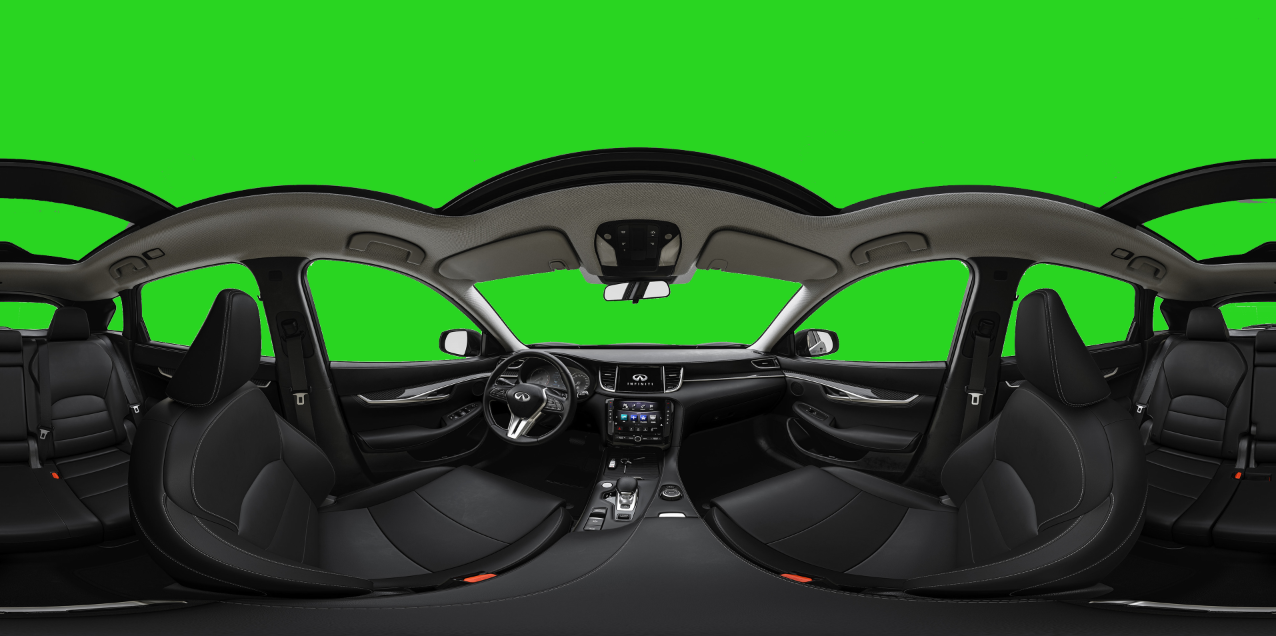
Mixed-Reality (Passthrough + Stereo 360 / 180 Video)
Render a stereo video (360 or SBS 180°) on top of an OpenXR passthrough layer, with a chroma-keyed backdrop so the real world shows through where the studio backdrop was.
Supported HMDs
Passthrough is auto-selected from sightlab.getConfig():
| Vizconnect config | Extension used |
|---|---|
| Meta Quest Pro / Quest 3 | xr.getPassthroughFB() |
| Varjo | xr.getPassthroughVarjo() |
| Vive Focus Vision | xr.getPassthroughHTC() |
Other configs log a warning and no-op.
Quick start
import sightlab_utils.sightlab as sl
from sightlab_utils.settings import *

sightlab = sl.SightLab()
sightlab.setHeadlight(True)

# Optional runtime helpers for SBS Video
sightlab.enableTransportToggleKey()       # 'y' toggles walking on/off
sightlab.enableEnvironmentNudgeKeys()     # '[' / ']' move scene closer / farther
sightlab.enableEnvironmentVerticalKeys()  # '9' / '0' move scene down / up
sightlab.enableEnvironmentPitchKeys()     # '7'/ '8' move pitch up/down

def sightLabExperiment():
    yield viztask.waitEvent(EXPERIMENT_START)
    viz.callback(viz.getEventID('ResetPosition'), sightlab.resetViewPoint)
    for trial in range(sightlab.getTrialCount()):
        yield viztask.waitEvent(TRIAL_START)

        sightlab.enableMixedReality(keyColor=(0.20, 0.23, 0.28))
        # optional one-shot offset/scale
        # sightlab.setEnvironmentOffset(pos=(0, -0.2, 0.5), scale=0.4)
        yield viztask.waitEvent(TRIAL_END)

viztask.schedule(sightlab.runExperiment)
viztask.schedule(sightLabExperiment)
In the GUI, set the trial mode to MEDIA_360 with format either Mono, Stereo, or Stereoscopic L/R.
API
enableMixedReality(keyColor, threshold, softness, spill)
Turn on passthrough and chroma-key the current panorama sphere. Works on all three sphere types: MonoSphere (360 mono), StereoSphere (360 top/bottom stereo), and Stereo180Sphere (180° SBS stereo). If the current environment isn't a panorama sphere, passthrough still turns on but the chroma key is skipped (a warning is logged).
| Arg | Default | What it does |
|---|---|---|
keyColor |
(0.20, 0.23, 0.28) |
Backdrop color (R,G,B in 0–1). Sample a clean wall pixel and divide by 255. Saturated colors (bright green, magenta, blue) work best — see Tuning the key. |
threshold |
0.02 |
Chroma distance below which pixels are fully removed. Higher = more aggressive key (eats subject). Practical range ~0.01–0.7. |
softness |
0.02 |
Width of the soft alpha edge beyond threshold. Higher = smoother silhouette but more bleed. |
spill |
0.2 |
Removes backdrop hue from edge pixels (skin tinting). 0 disables. |
disableMixedReality() reverses both the chroma key and the passthrough toggle.
setPassthrough(state=True, clearColor=viz.BLACK)
Lower-level: enable/disable passthrough only (no chroma key). Caches/restores the prior clear color.
setEnvironmentOffset(pos=(x, y, z), euler=None, scale=None)
Shift / rotate / scale the 360 / 180 sphere relative to the viewer.
| Arg | Effect |
|---|---|
pos |
Cumulative translation in meters. +x right, +y up, +z forward (away). |
euler |
Absolute (yaw, pitch, roll) in degrees applied to the sphere. |
scale |
Float (uniform) or (sx, sy, sz). Smaller = subject appears closer/larger. |
Each pos call is additive (good for keyboard nudge).
Keyboard helpers
| Method | Default keys | Action |
|---|---|---|
sightlab.enableTransportToggleKey(key='y') |
y |
Toggle main transport (walking) on/off |
sightlab.enableEnvironmentNudgeKeys(forwardKey=']', backKey='[', step=0.1) |
] [ |
Push scene farther / pull closer along Z |
sightlab.enableEnvironmentVerticalKeys(upKey='0', downKey='9', step=0.1) |
0 9 |
Raise / lower scene along Y |
sightlab.enableMediaSkipKeys(forwardKey='v', backKey='c', step=5) |
v c |
Skip media forward / back (seconds per press) |
All are opt-in — keys aren't bound until you call the method. step is meters per keypress (or seconds, for enableMediaSkipKeys).
sightlab.enableMediaSkipKeys()              # 'v' = +5s, 'c' = -5s
sightlab.enableMediaSkipKeys(step=10)       # 10-second jumps
sightlab.enableMediaSkipKeys('.', ',', 2)   # custom keys, 2-second jumps
Tuning the key
The key operates on chroma only (BT.601 Cb/Cr), ignoring brightness. This is great for saturated backdrops and intentionally luma-independent (lighting falloff on the backdrop won't break the key), but it has implications:
- Saturated keys work best. Bright green
(0.0, 1.0, 0.0), magenta(1.0, 0.0, 1.0), or strong chroma-key blue give the cleanest results. - Gray / white / black keys do not work well. Gray is achromatic, so its chroma distance to many real-world pixels (skin, walls, shadows) is also small, meaning a wide swath of the video gets keyed out along with the backdrop. Use a saturated backdrop in your source footage when possible.
- Desaturated colored keys (muted blue, beige, tan) are in between — workable but require careful threshold tuning.
Adjustment recipes:
| Symptom | Fix |
|---|---|
| Too much subject removed | Lower threshold (try 0.015, 0.01) |
| Not enough backdrop removed (too much video, little passthrough) | Raise threshold in steps (0.05 → 0.2 → 0.4); add softness (0.05–0.15) for smoother edges |
| Backdrop bleeds through at edges | Raise threshold slightly, then raise softness |
| Subject has a blue/gray tint on shoulders/skin | Raise spill (0.3–0.7) |
| Silhouette is jaggy | Raise softness (0.03–0.06) |
| Hardly any video showing (~99% passthrough) | threshold + softness is too wide for your key color, or the key color is too desaturated. Lower threshold first; if you need that wide a band to remove the backdrop, the backdrop color is too close to the rest of the scene — change the key color or pre-process the footage. |
Effective key radius ≈ threshold + softness. Pushing the sum past ~0.7 will key out essentially everything in the frame.
For best results, sample the actual backdrop color from a video frame (paint app eyedropper, divide RGB by 255) instead of guessing.
For images or video with complex backgrounds it is recommended to use a tool such as Photoshop or Premiere to remove the background first.
Notes / gotchas
- Transport is auto-enabled for SBS 180 trials so the participant can move; for full 360 it stays disabled.
- Calling
enableMixedReality()before a trial loads will warn and no-op — call it afterTRIAL_START(or per the sample script above). - All keybinding helpers and
setEnvironmentOffsetare dormant unless called; leaving them out has no side effects. - Several keys are taken by SightLab's other features (
;,k,l,i,j,u,o,f,g,h,.,1,p, Tab, Shift-L, arrow keys when transport is enabled). Pick free keys if overriding.