Visuomotor path tracing task
Built with WorldViz Vizard 8 + SightLab VR
Vive Focus Vision • HTC OpenVR
Author: Aleksandar Dimov, BIOPAC Systems Inc. 2026
Created using Claude Caude
1. Overview
This document describes a VR-based visuomotor path tracing experiment implemented in Python using the WorldViz Vizard 8 SDK and the SightLab VR research framework. The task is designed for use with the HTC Vive Focus Vision head-mounted display and its paired controllers but can also work on other HMDs supported by SightLab VR. If the HMD does not have an eye-tracker, the software will use the middle of the field of view as an eye-tracking proxy.
The paradigm asks a participant to use the right-hand controller to trace a circular path displayed in 3D space in front of them. The system continuously measures how accurately they follow the path, records gaze behavior via the integrated eye tracker, streams data to external recording software via Lab Streaming Layer (LSL), and plays real-time audio feedback indicating whether the participant is on or off target.
The script is designed to be researcher-configurable: all parameters that would typically be adjusted between studies (path size, thresholds, colors, audio, display options) are collected at the top of the file under a clearly marked section, with comments explaining the effect of each value.
1.1 What this template is for
This template is appropriate for:
- Feasibility pilots establishing baseline visuomotor tracing norms
- Motor learning studies tracking performance improvement across trials
- Neurorehabilitation assessments of upper limb coordination (e.g., post-stroke)
- Gaze-hand coordination research using integrated eye tracking
- Multimodal physiological recording studies when combined with BIOPAC via SightLab
1.2 What the paradigm is called in the literature
This task is most precisely described as a VR-based visuomotor path tracing task. Related terms in the literature include:
- Visuomotor tracing task — standard when emphasizing hand-eye coordination
- Path tracing task — when the focus is on following a predefined trajectory
- Contour tracing — used when the path is a shape outline such as a circle
- Visually guided reaching/tracing — emphasizes the visual target component
2. System Requirements
- WorldViz Vizard 8 (Python-based VR SDK)
- SightLab VR — licensed and configured
- HTC Vive Focus Vision headset with right-hand controller
- SteamVR installed and running
- Python packages: pylsl (pip install pylsl), vizshape (bundled with Vizard)
- Lab Streaming Layer (LSL) receiver software if streaming data externally (e.g., LabRecorder)
- BIOPAC AcqKnowledge (optional) — SightLab sends hardware markers automatically if configured. A BIOPAC system is required when also recording EMG at the same time or additional physiological parameters related to task performance, fatigue, stress, etc.
3. Task Design
3.1 Scene setup
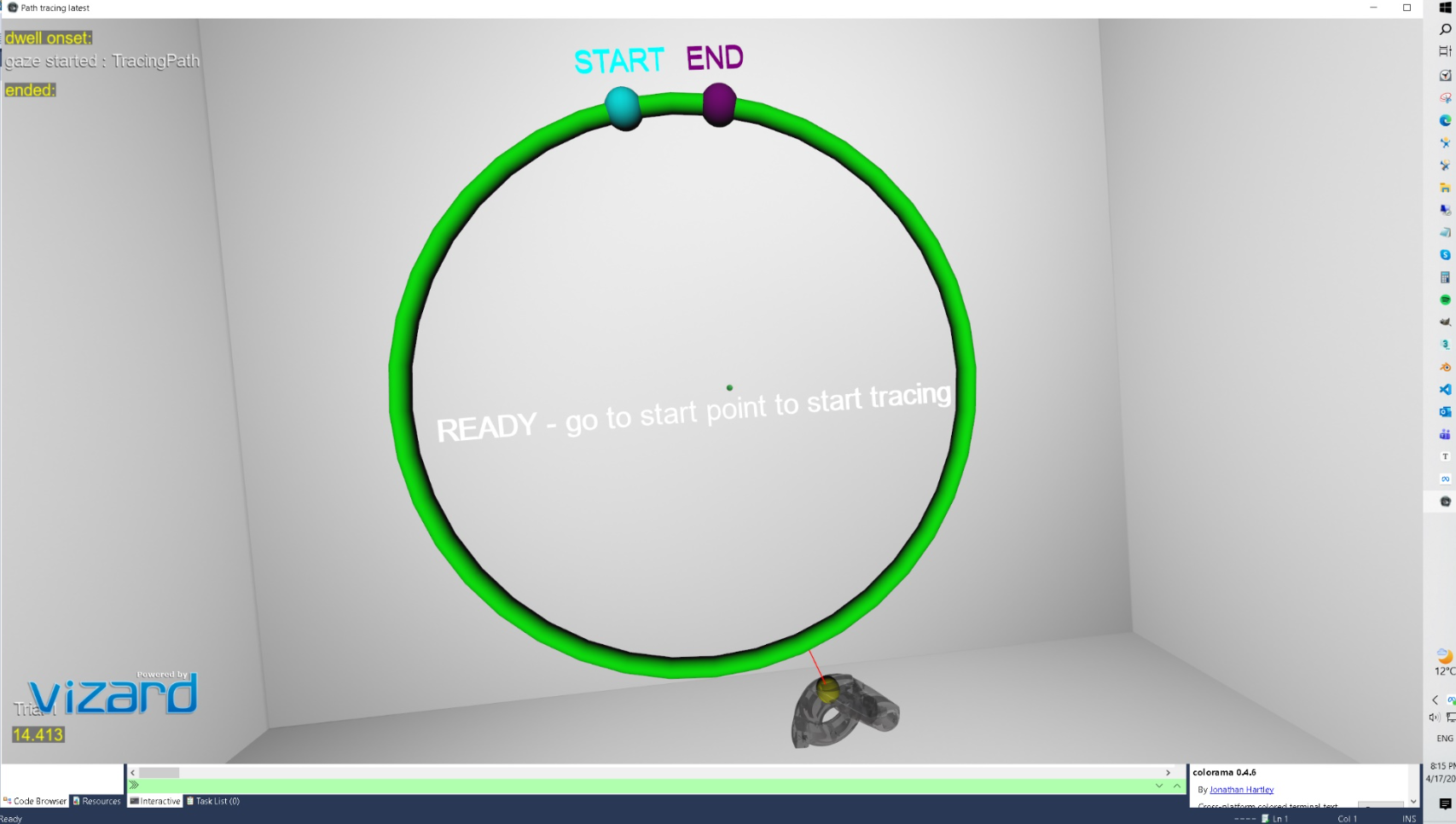
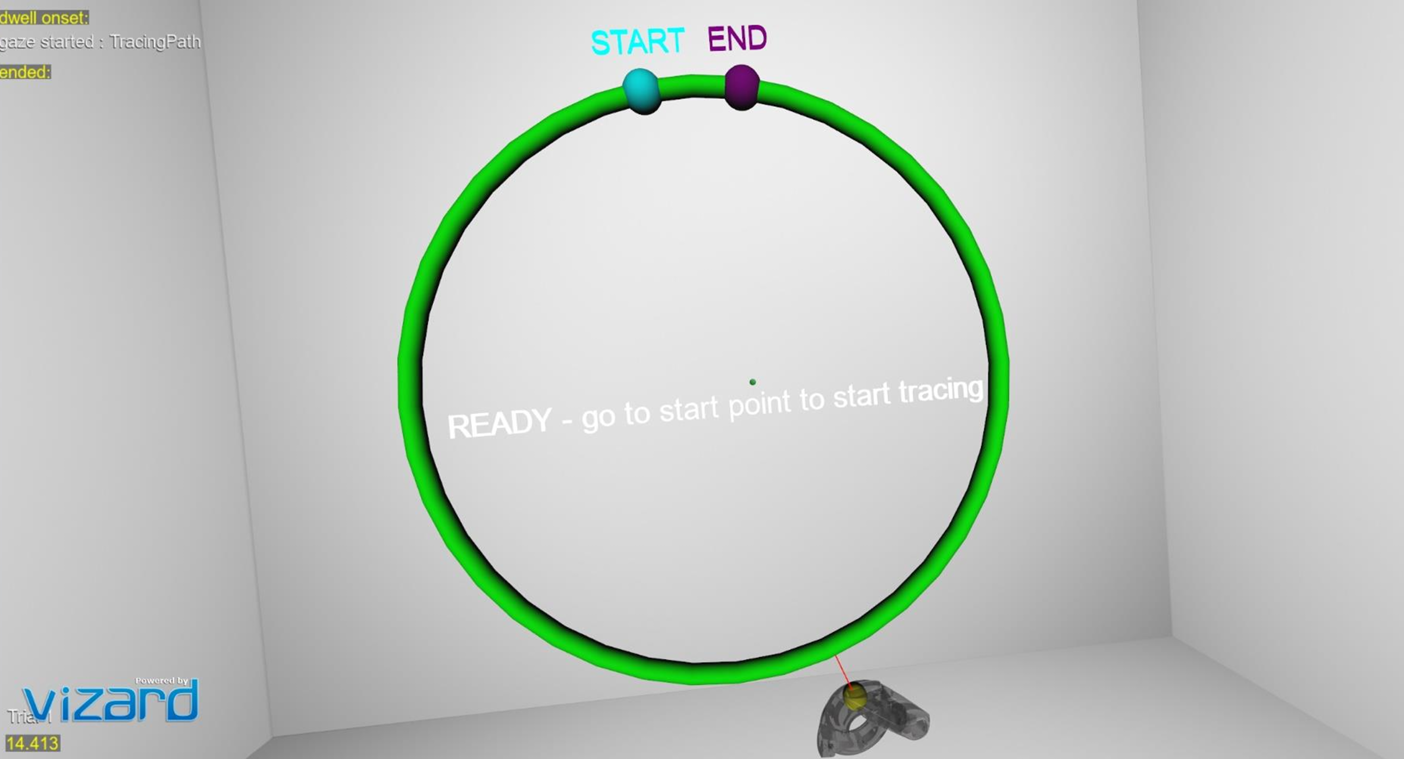
When the experiment launches, the participant sees a white virtual room (whiteroom.osgb). Positioned in front of them at approximately eye height and arm’s length is a green circular torus — the tracing path. Two small colored spheres mark the start (cyan) and end (purple) positions on the ring, with text labels floating above each.
The participant holds the right-hand Vive controller. A small yellow sphere (the cursor) tracks the controller position in real time. A red line connects the cursor to the nearest point on the circle, providing continuous visual feedback of the tracing error.
3.2 Trial flow
Each trial follows this sequence:
- READY state — participant sees the prompt to move to the start marker. The left trigger must be pressed to activate the trial.
- WAITING state — the trial is active. The participant moves their controller to the cyan START marker. Proximity detection automatically begins tracing when they arrive.
- TRACING state — data recording begins. The participant traces the circle toward the purple END marker. Error metrics, gaze data, and audio feedback are all active.
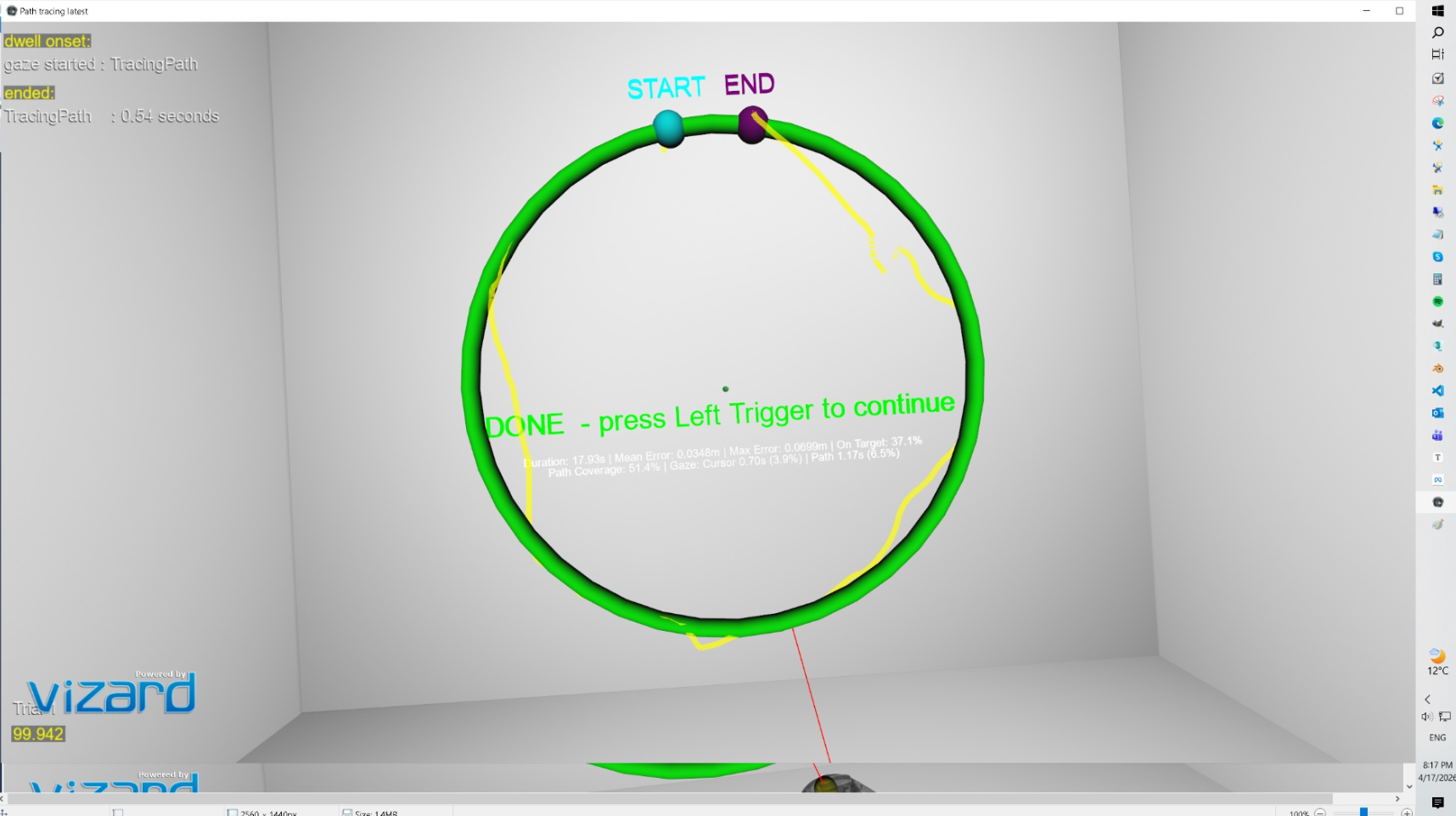
- DONE state — reaching the END marker stops the trial automatically. A summary of results appears in the headset. The researcher presses the left trigger to proceed to the next trial.
The number of trials is set in the SightLab experiment configuration GUI, not in the script itself.
3.3 Audio feedback
While tracing is active, the participant hears continuous audio tones. A pleasant tone (default: 440 Hz, concert A) plays when the cursor is within the target distance of the path. An unpleasant lower tone (default: 200 Hz) plays when the cursor drifts outside the tolerance zone. This provides real-time auditory reinforcement without the participant needing to look at a display. Audio can be disabled entirely via a single parameter.
3.4 Tracing trail
An optional 3D line trail can be rendered during tracing, showing the path actually traced by the controller in the session. The trail matches the cursor colour and is rendered at 70% opacity. It is automatically cleared between trials so each session starts fresh. This feature is toggled by a single parameter.
3.5 Path coverage
The circle is divided into 360 angular bins (one per degree). As the participant traces, any bin within the target distance is marked as visited. At the end of the trial the system reports what percentage of the full circle was actually covered. This is important because a participant may only trace over a portion of the path and still show a low mean error — path coverage distinguishes partial tracing from full tracing.
4. Configurable Parameters
All parameters are defined in the RESEARCHER-CONFIGURABLE PARAMETERS section at the top of the script. No other sections of the code need to be modified for typical experimental variations. The table below describes each parameter.
4.1 Environment and path geometry
| Parameter | Default Value | Effect | When to Change |
|---|---|---|---|
| ENVIRONMENT_FILE | whiteroom.osgb | Loads the 3D VR scene. Change the path to load a different room or environment. | When you want a different background scene. |
| CIRCLE_RADIUS | 0.3 m | Radius of the circular tracing path. Larger values create a bigger ring. | Increase for gross motor tasks; decrease for fine motor precision tasks. |
| TUBE_RADIUS | 0.01 m | Thickness of the visible torus tube. | Thicker tubes are easier to see; thinner tubes increase visual precision demands. |
| CIRCLE_CENTER | [0, 1.7, 0.4] | X, Y, Z position of the circle centre in metres. Y controls height; Z controls depth. | Adjust for participant height or to place the path closer/further away. |
| PATH_COLOR | viz.GREEN | Colour of the tracing path torus. | Change for visual contrast or colour-blindness accommodations. |
4.2 Cursor
| Parameter | Default Value | Effect | When to Change |
|---|---|---|---|
| CURSOR_RADIUS | 0.015 m | Size of the yellow cursor sphere. | Smaller cursors increase task precision demands. |
| CURSOR_COLOR | viz.YELLOW | Colour of the cursor sphere. | Change for visibility against different backgrounds. |
4.3 Start and end markers
| Parameter | Default Value | Effect | When to Change |
|---|---|---|---|
| SEPARATION_ARC | 0.10 m | Arc distance between the start and end markers along the circle. Controls how close together they are placed. | Larger values mean the participant must trace more of the circle before reaching the end. |
| MARKER_RADIUS | 0.02 m | Size of the start and end marker spheres. | Increase if participants have difficulty locating the markers. |
| START_MARKER_COLOR | viz.CYAN | Colour of the start marker. | Change to distinguish from cursor or path. |
| END_MARKER_COLOR | viz.PURPLE | Colour of the end marker. | Change to distinguish from other objects. |
4.4 Thresholds
| Parameter | Default Value | Effect | When to Change |
|---|---|---|---|
| PROXIMITY_THRESHOLD | 0.03 m | How close (in metres) the cursor must be to a marker to trigger the start or end of tracing. | Increase if participants struggle to activate markers; decrease for stricter entry conditions. |
| TARGET_DISTANCE | 0.02 m | Maximum distance from the path that counts as on-target. Used for on-target percentage and audio feedback. | Decrease to tighten the acceptable tolerance zone; increase to make the task easier. |
4.5 LSL data stream
| Parameter | Default Value | Effect | When to Change |
|---|---|---|---|
| LSL_STREAM_NAME | Tracing Data | Name of the LSL stream broadcast for external recording software such as LabRecorder. | Change if running multiple streams simultaneously or to match your recording software configuration. |
| LSL_CHANNEL_COUNT | 2 | Number of LSL channels. Channel 1 = tracing error; Channel 2 = marker state. | Do not change unless you modify the LSL push logic in update(). |
| LSL_SAMPLE_RATE | 100 Hz | Declared sample rate in the LSL stream metadata. | Adjust to match your intended recording resolution. |
4.6 Audio feedback
| Parameter | Default Value | Effect | When to Change |
|---|---|---|---|
| AUDIO_FEEDBACK_ENABLED | True | Enables or disables all audio feedback. Set to False to run the task silently. | Disable for control conditions or when audio is not desired. |
| AUDIO_FREQ_ON_TARGET | 440 Hz | Frequency of the pleasant tone played when cursor is on target. 440 Hz is concert A. | Increase for a brighter tone; decrease for a duller tone. |
| AUDIO_FREQ_OFF_TARGET | 200 Hz | Frequency of the unpleasant tone played when cursor is off target. | The contrast between on/off target frequencies drives the reinforcement. A larger gap = stronger signal. |
| AUDIO_VOLUME | 0.5 | Volume of both tones. Range 0.0 (silent) to 1.0 (maximum). | Reduce in noisy environments; increase if participants report difficulty hearing feedback. |
4.7 Tracing trail
| Parameter | Default Value | Effect | When to Change |
|---|---|---|---|
| SHOW_TRACING_TRAIL | True | Enables a 3D line trail showing the path traced by the cursor during the trial. Cleared at trial start. | Disable to reduce visual clutter, or in conditions where seeing prior performance would confound the task. |
| TRAIL_COLOR | CURSOR_COLOR | Colour of the trail line. | Defaults to the cursor colour for visual consistency. |
| TRAIL_ALPHA | 0.7 | Opacity of the trail. 0.0 = invisible; 1.0 = fully opaque. | Reduce for a more subtle trail; increase for a clearer record of the traced path. |
4.8 SightLab gaze object tracking
| Parameter | Default Value | Effect | When to Change |
|---|---|---|---|
| SIGHTLAB_GAZE_OBJECTS | True | Registers the cursor and tracing path as SightLab gaze objects, enabling dwell time and fixation logging in SightLab’s built-in output. | Disable to suppress SightLab console output for dwell onset/ended events, or if gaze object tracking is not needed. |
5. Outcome Measures
At the end of each trial, results are printed to the Vizard console, displayed in the headset (if the summary overlay is enabled), and saved to a cumulative CSV file. The measures reported are:
| Metric | Description | Interpretation |
|---|---|---|
| Duration | Total elapsed time from START marker activation to END marker activation, in seconds. | Task completion time. Faster times with equivalent accuracy indicate improved motor efficiency. |
| Mean Error | Average Euclidean distance (metres) between the cursor and the nearest point on the circle, computed every frame during tracing. | Primary spatial accuracy metric. Lower is better. Directly comparable to absolute mean error in the literature. |
| Max Error | Maximum single-frame deviation from the path during the trial, in metres. | Captures worst-case deviations. Sensitive to sudden loss of control or attention lapses. |
| On Target % | Percentage of frames during which the cursor was within TARGET_DISTANCE of the path. | Equivalent to Percentage of Task Time within Target Region (PTTR). Higher is better. |
| Path Coverage % | Percentage of the full circle (360 angular bins) that was traced within TARGET_DISTANCE. | Distinguishes participants who traced only part of the path from those who completed the full circle. |
| Gaze: Cursor (s / %) | Total seconds and percentage of tracing duration during which the participant’s gaze intersected the cursor sphere. | Looking at the hand more is associated with feedback-dependent, less skilled control. |
| Gaze: Path (s / %) | Total seconds and percentage of tracing duration during which the participant’s gaze intersected the tracing path. | Looking ahead at the path (rather than at the hand) is associated with feedforward, more skilled control. |
5.1 LSL stream channels
While tracing is active, the LSL stream pushes samples at the frame rate with the following structure:
- Channel 1 (error): Euclidean tracing error in meters. Value is -1 when not tracing.
- Channel 2 (marker): 1 while tracing is active; 0 during the 100 ms trial-start pulse; -1 otherwise.
This stream can be received by any LSL-compatible software for synchronization with other physiological signals (EEG, EMG, BIOPAC). It has been tested with BIOPAC’s AcqKnowledge and it is easiest to use with that software.
5.2 CSV output
A cumulative file named stats.csv is written to the SightLab experiment data folder for each session. It is created on the first trial and appended for each subsequent trial. Columns are:
Trial, Duration_s, MeanError_m, MaxError_m, OnTarget_pct, PathCoverage_pct,
GazeCursor_s, GazeCursor_pct, GazePath_s, GazePath_pct
6. Gaze and Eye Tracking
The script uses SightLab’s eye tracker integration to perform per-frame gaze intersection testing. Each frame during tracing, a ray is cast from the eye tracker origin in the gaze direction. If the ray intersects the cursor sphere, gaze-on-cursor time accumulates; if it intersects the tracing path torus, gaze-on-path time accumulates.
The cursor has intersection enabled (required for gaze detection), while the right-hand controller avatar model has intersection disabled. This prevents the controller model from occluding the cursor and causing false gaze detections.
The gaze cursor vs. path split is clinically meaningful: participants who spend more time looking at their own hand (cursor) are using feedback-dependent control, which is associated with lower skill level and is commonly seen in early motor learning or after neurological injury. As performance improves, gaze typically shifts to lead the hand, looking ahead at the path rather than at the cursor.
7. BIOPAC and Physiological Measurement Integration
SightLab VR has built-in support for BIOPAC AcqKnowledge. If BIOPAC is enabled in the SightLab GUI, hardware trigger markers are sent automatically at experiment events (trial start, trial end). The script registers an onExit handler that safely stops the BIOPAC acquisition server when the experiment closes.
For EMG specifically, the tracing task is well-suited for recording from the forearm flexors and extensors, the anterior deltoid, and the biceps/triceps. The continuous, cyclical nature of the circle task allows within-trial amplitude comparisons (e.g., comparing EMG during on-target vs. off-target segments) as well as across-trial fatigue analysis.
BIOPAC offers a wide range of wireless and wired EMG amplifiers.
8. Code Structure
The script is a single Python file structured in the following order:
8.1 Configurable parameters block
All researcher-facing settings are at the top of the file, clearly delimited by comment banners. This is the only section most researchers will need to edit.
8.2 Scene initialization
After the parameters block, the script initializes SightLab, loads the environment, creates the tracing path torus, cursor sphere, start/end markers, labels, error line, LSL outlet, audio tone files, and status/summary text overlays. These run once at startup.
8.3 update() function
This function is called every frame via vizact.ontimer(0, update). It performs the following in sequence each frame:
- Reads the right-hand controller world position by combining the tracker node and transport node offsets
- Computes the nearest point on the circle using 2D polar projection
- Updates the error line endpoints
- Computes the Euclidean tracing error
- Accumulates error statistics and pushes an LSL sample if tracing is active
- Runs gaze intersection testing against the cursor and path if eye tracking is available
- Updates audio feedback state (on-target tone, off-target tone, or silence)
- Appends a trail segment if trail rendering is enabled and tracing is active
- Checks proximity to START and END markers to transition tracing state
8.4 sightLabExperiment() coroutine
This is a Vizard task coroutine scheduled with viztask.schedule(). It controls the experiment-level loop: waiting for the experiment start event, initialising tracker references, then iterating through trials. For each trial it:
- Waits for the left trigger press to begin
- Calls sightlab.startTrial() to log the trial start in SightLab’s data files
- Resets all accumulators (error, gaze time, path coverage bins, trail segments)
- Waits for the left trigger press again to end the trial
- Prints and saves the trial summary to the CSV file
- Calls sightlab.endTrial() to finalise SightLab’s trial record
8.5 onExit() handler
Registered with Python’s atexit module. Safely stops the BIOPAC AcqKnowledge server and data server when the Vizard window is closed, preventing incomplete acquisition files.
9. Notes, Tips, and Common Issues
9.1 Controller vs. hand tracking
This template uses the right-hand controller as the end-effector. The Vive Focus Vision also supports optical hand tracking, but for path tracing tasks controllers are preferred in the research literature because the tracked point is fixed and unambiguous, tracking is lower noise, and metrics are directly comparable across labs. Hand tracking is appropriate if the research question specifically concerns hand or finger kinematics, or if the participant population cannot grip a controller.
9.2 Participant height and arm reach
The CIRCLE_CENTER parameter should be adjusted to suit the participant population. The default Y value of 1.7 m corresponds to approximately standing eye level for an average adult. For seated participants, this value typically needs to be lowered to approximately 1.2–1.4 m. The Z value of 0.4 m places the path at comfortable arm’s length; increase this value if participants report the path feels too close.
9.3 Gaze tracking accuracy
The per-frame gaze intersection method used here (ray-sphere intersection) is sensitive to gaze calibration quality. Always run the SightLab eye tracking calibration procedure before data collection. If gaze data is unavailable for a frame (e.g., due to a blink or tracking loss), the intersection test will return no valid hit and that frame will not be counted toward either gaze accumulator — gaze time totals will be slightly underestimated during blink periods, which is expected behavior.
9.4 LSL timing
LSL samples are pushed inside update(), which runs at the Vizard render frame rate (typically 72–90 Hz for the Vive Focus Vision). The declared LSL sample rate is set to 100 Hz in LSL_SAMPLE_RATE. The actual rate may vary slightly with frame timing. If precise timing alignment with external signals is critical, use the LSL timestamp from the receiving end rather than a fixed sample count.
9.5 Audio file generation
Audio tones are generated as temporary WAV files in the system’s temp directory at startup using Python’s built-in wave module. No external audio assets are required. The files are named vr_tone_440.wav and vr_tone_200.wav (using the configured frequencies). If you change the frequencies, new files will be generated automatically on the next run.
9.6 BIOPAC exit handling
If AcqKnowledge is running and the Vizard window is closed unexpectedly (e.g., via the task manager), the atexit handler may not fire. In this case, AcqKnowledge should be manually stopped from within the AcqKnowledge interface. Always end the experiment using the normal SightLab stop procedure to ensure clean file closure.
10. Suggested Extensions
The following features are not yet implemented but are natural extensions of this template based on the visuomotor tracing literature:
10.1 Additional path shapes
- Figure-eight (lemniscate) path — challenges bimanual coordination and crossing the midline
- Sinusoidal / maze-like paths — add unpredictability and spatial planning demands
- Moving target the participant follows — converts the static tracing task to a dynamic pursuit tracking task
10.2 Additional difficulty manipulations
- Path width / tolerance zone — narrow the TARGET_DISTANCE progressively across sessions
- Movement gain — scale the ratio of real hand movement to virtual cursor movement (a powerful motor adaptation lever)
- Time pressure — add a countdown timer that the participant must beat
- Visual noise or perturbation — jitter the cursor position to study adaptation
10.3 Additional outcome measures
- Jerk (rate of change of acceleration) — the standard smoothness metric in motor control
- Cumulative micropause duration — detects submovements and quantizes movement continuity
- Gaze-hand lag — how far ahead of the cursor the gaze is leading, frame-by-frame
- Screenshot of traced path overlaid on target path — useful for qualitative assessment
10.4 Physiological augmentation
- EMG from forearm flexors/extensors and deltoid — synchronized via LSL for fatigue and feedforward/feedback timing analysis
- EEG — motor cortex alpha/beta suppression during tracing; error-related negativity on off-target events
- Galvanic skin response — correlates with frustration during off-target periods
11. Relevant References
The following publications are directly relevant to the design and interpretation of this paradigm:
King, L. A. et al. (2013). Use of a Tracing Task to Assess Visuomotor Performance: Effects of Age, Sex, and Handedness. Journal of Motor Behavior. — Establishes the circle tracing paradigm and the core metrics: absolute mean error, PTTR, complexity index, and cumulative micropause duration.
Vignais, N. et al. (2023). Impact of task constraints on a 3D visuomotor tracking task in virtual reality. Frontiers in Virtual Reality. — HTC Vive Pro Eye study establishing the effect of speed, gain, and workspace size on tracing error and elbow kinematics. Directly comparable methodology.
Roy, R. et al. (2018). Development of a quantitative evaluation system for visuo-motor control in three-dimensional virtual reality space. Scientific Reports. — Validates circular tracking on frontal and sagittal planes in VR with millimetre-level accuracy; discusses monocular vs. binocular vision effects.
Hebert, J. S. et al. (2019). Quantitative Eye Gaze and Movement Differences in Visuomotor Adaptations to Varying Task Demands Among Upper-Extremity Prosthesis Users. JAMA Network Open. — Documents the gaze-toward-hand vs. gaze-toward-target distinction as a measure of control strategy and skill level.
Levin, M. F. et al. (2023). Eye tracking in virtual reality for neurorehabilitation: a narrative perspective. Frontiers in Virtual Reality. — Reviews the clinical value of integrated eye tracking in VR rehabilitation, directly supporting the gaze measures implemented in this template.
Anglin, J. M. et al. (2017). Visuomotor adaptation in head-mounted virtual reality versus conventional training. Scientific Reports. — Provides context for interpreting visuomotor adaptation rates in HMD-based VR relative to real-world performance.
Screenshots