Third Person
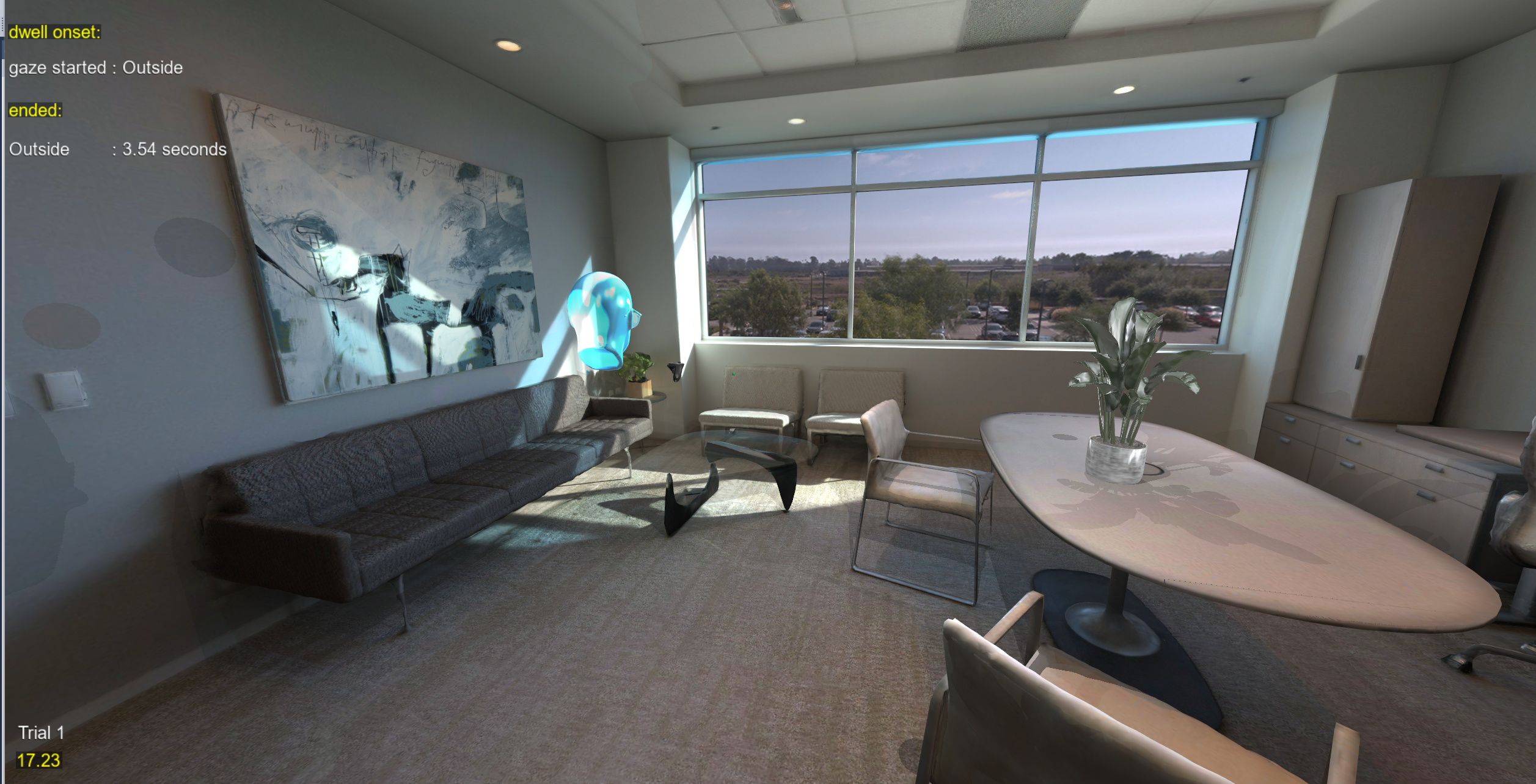
Located in ExampleScripts\Third Person View
Third person views show the participant's avatar and what is around them, instead of looking out through their eyes. SightLab has two:
- During an experiment: press
bto switch the Desktop view between first person and two third-person cameras. See Third Person During an Experiment. - In Session Replay: check Third Person under Views to follow the participant from behind. See Third Person in Session Replay.
In both, only the camera moves. Gaze, head position and everything else SightLab records still come from the participant's own eyes.
Third Person During an Experiment
The Third Person View example (ExampleScripts\Third Person View\SightLab_VR.py) is a basic SightLab script with the third-person view added. Run it with a Desktop configuration, and press b to cycle through:
- First person (the participant's own eyes)
- Behind and above the participant
- Over the participant's right shoulder
and back to first person.
This works on Desktop configurations only. In a headset the view always stays first person, and b does nothing.
Adding It to Your Own Script
Import ThirdPersonView and create it once, after EXPERIMENT_START and before the trial loop:
from sightlab_utils.third_person import ThirdPersonView

def sightLabExperiment():
    yield viztask.waitEvent(EXPERIMENT_START)
    ThirdPersonView(sightlab)

    for trial in range(sightlab.getTrialCount()):
        yield viztask.waitEvent(TRIAL_START)
        ...
It needs to be created after EXPERIMENT_START, because that is when SightLab has loaded the hardware configuration it checks for Desktop. Create it only once; the views stay available for every trial.
What You See
- Looking around: turning left or right with the mouse swings the camera around the participant. Looking up or down only tilts the camera, so it never dips into the ground.
- The participant: their avatar head is shown in the third-person views so you can see where they are, and hidden again in first person. If a full-body avatar is used, its body already shows them, so the extra head is not added.
- Walls and objects: if a wall, vehicle or other object comes between the participant and the camera, the camera moves in front of it rather than showing the inside of it.
- The gaze point still marks what the participant is looking at.
Data Is Unchanged
The third-person views only change what is shown on the screen. The gaze ray, the gaze point, the head position and anything else measured from the participant's viewpoint (such as walking speed) are recorded exactly as in first person, whichever view is showing. A session recorded while using third person replays the same as any other session.
Options
ThirdPersonView takes these optional arguments:
| Argument | Default | What it does |
|---|---|---|
views |
Behind and above, then over the right shoulder | The third-person views b cycles through after first person. Each one is ([x, y, z], tilt): the camera's position relative to the participant's head in meters, measured in the direction they face (+x is to their right, +y is up, -z is behind them), and how many degrees the camera tilts down. |
exclude_node_names |
None | Names of objects in the environment the camera can pass through, such as invisible objects placed only to catch gaze. Without this, they would push the camera in like a wall. |
key |
'b' |
The key that cycles the views. Change it if your script already uses b. |
The default views are:
views = [
    ([0.0, 0.6, -3.0], 5),      # behind and above
    ([0.5, 0.1, -1.5], 0),      # over the right shoulder
]
Example with one view placed higher and further back, an invisible object the camera may pass through, and t as the key:
ThirdPersonView(sightlab,
    views=[([0, 1.5, -4], 15)],
    exclude_node_names=['crate.osgb'],
    key='t')
If your hardware configuration has a toggleViews Vizconnect event (for example mapped to a controller button), it cycles the views as well.
Older SightLab Versions
Older SightLab versions don't include sightlab_utils/third_person.py. To use it with one, copy third_person.py into a modules folder next to your script (with an empty __init__.py file in it), and import it this way, which uses SightLab's copy when there is one:
try:
    from sightlab_utils.third_person import ThirdPersonView
except ImportError:
    from modules.third_person import ThirdPersonView
The Street Walking Example does this and includes a copy of third_person.py in its modules folder.
Third Person in Session Replay
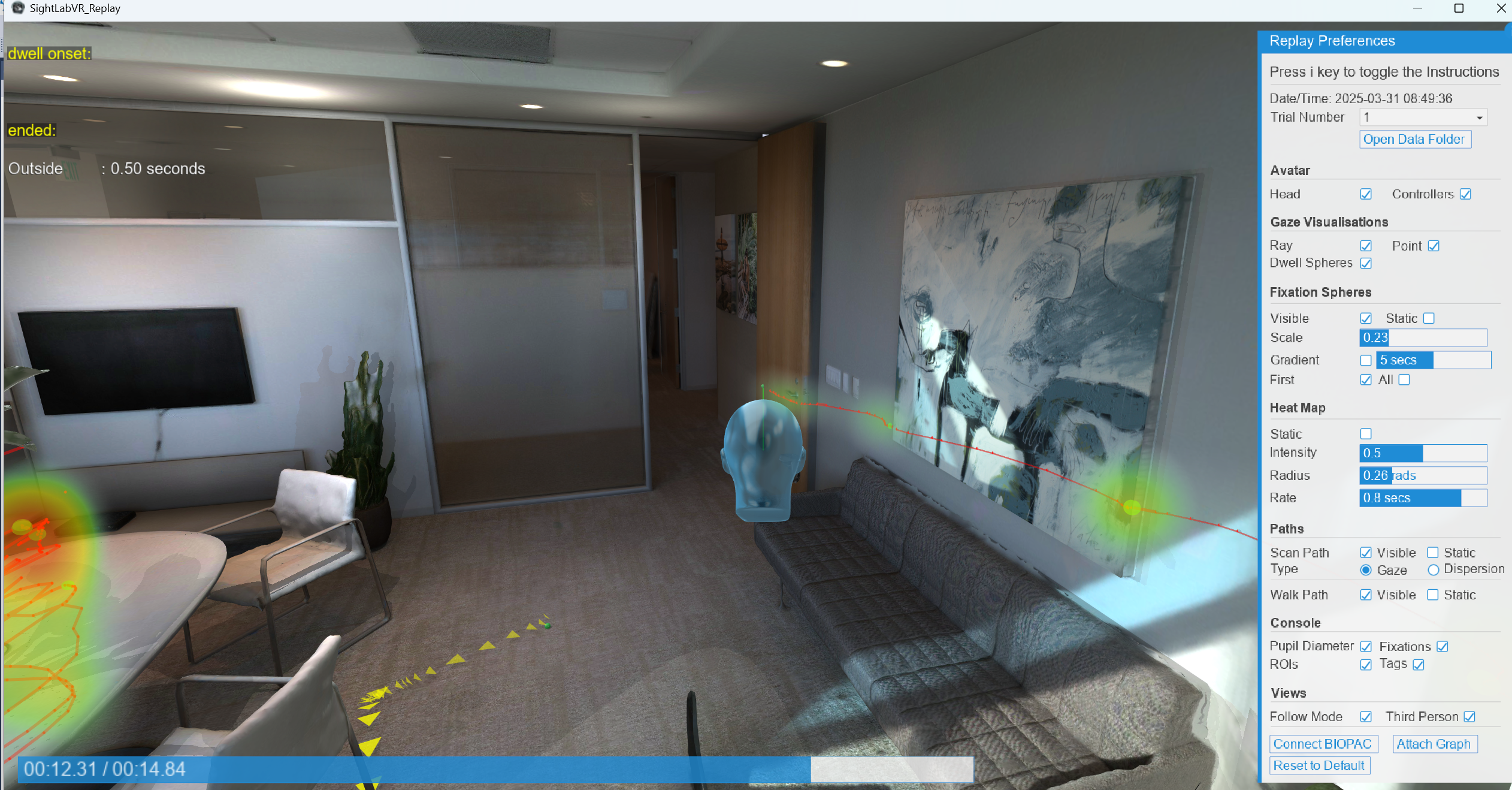
To watch a recorded session in third person, run the replay script (SightLabVR_Replay.py in the Third Person View example, or your own project's replay script) and check Third Person under Views in the Replay Preferences panel. The camera follows the participant from just behind and above their head, so you can see their avatar head along with what they were looking at, such as the gaze ray, fixations, heat map and walk path.
This works for any recorded session, whether or not the experiment script used ThirdPersonView.
- Checking Third Person also turns on Follow Mode. Unchecking it returns to the first-person view.
- The camera turns with the direction the participant faces but ignores head tilt, so the view stays level.
- Hold the right mouse button and drag to orbit the camera around the participant's head (left/right to circle around, up/down to swing below or above). When you let go, the camera eases back behind them.
- The avatar head is shown if Head is checked under Avatar.
- Available for 3D model scenes only, and turns off when you change trials.
Changing Where the Replay Camera Sits
In the replay script, setThirdPersonOffset sets the camera position relative to the participant's head. offset is [x, y, z] in meters, measured in the direction the participant faces (+y is up, -z is behind them), and pitch is how many degrees the camera tilts down toward them. The default is [0, 0.5, -1.5] with a pitch of 15.
replay = Replay.SightLabReplay()
replay.setThirdPersonOffset([0, 1.5, -4], pitch=20)
To start every trial in third person, turn it on each time a trial loads:
def startInThirdPerson():
    replay.replayGUI.thirdPersonON()
viz.callback(TRIAL_LOADED_EVENT, startInThirdPerson)
startInThirdPerson()   # the first trial has already loaded
See Session Replay for more replay options.